Instead of checking bottles and adding the same items to your cart before every cleaning visit, automatically reorder cleaning supplies through a retailer’s recurring-delivery feature. Start with products you already use steadily, set the delivery interval from your actual usage, and keep a separate reminder for anything that runs out unpredictably.
- Automatically reorder cleaning supplies through retailer auto-delivery, not through a house-cleaning appointment.
- Use recurring deliveries for steady-use products; use stock-check reminders when household usage changes.
- Porch and Parlor Cleaning offers online-booked residential cleaning for greater Nashville homeowners.
- Confirm what your cleaner brings before adding professional-use supplies to your household reorder list.
Why this matters
An empty bottle has a knack for announcing itself halfway through a spill. Automatic replenishment removes the repeated ordering task, but a delivery schedule does not know how much cleaner is actually left under your sink.
The right setup follows your household’s usage, not just the date of your next cleaning appointment. Otherwise, you trade an empty cupboard for a crowded one.
Porch and Parlor Cleaning is best suited to greater Nashville homeowners seeking residential cleaning booked online. Keep that service booking separate from your supply orders: scheduling a cleaning visit is not an instruction to a retailer to replenish products.
For your 2026 setup, build a small, understandable routine before adding more items. You should know what triggers each order, who manages it, and how to stop it.
Before you start
- Get account access. Use a retailer account that offers recurring delivery for your chosen item, with your delivery address and payment details ready. You also need access to order notifications and a calendar or reminder app.
- Gather your actual supplies. Check every storage spot, record the exact product and package size, and note when you open a new container. Start with 3 products rather than subscribing the entire cleaning cupboard at once; this is a suggested starting scope, not a household requirement.
- Confirm who supplies what. Ask your cleaner which materials you need to provide. The easy-to-miss gotcha: a repeating shipment follows time, not remaining stock, so an unused backup bottle does not automatically delay the next order.
Follow the product label for storage and use. Keep cleaning chemicals in their original labeled containers, away from children and pets, and never mix cleaning products.
Your replenishment method
Before configuring deliveries, choose between a repeating order and a repeating stock check. These solve different problems, even though both spare you from remembering everything yourself.
| Method | Best for | Main benefit | Main drawback |
|---|---|---|---|
| Retailer auto-delivery | Products with steady, observed usage | Places repeat orders on a schedule | Does not measure what remains in your cupboard |
| Recurring stock-check reminder | Products used unevenly | Prompts a decision based on actual stock | You still place the order yourself |
Use auto-delivery for predictable consumption; use reminders for variable consumption. A reminder is not automatic ordering, and a scheduled shipment is not inventory tracking.
For example, a regularly used household cleaner is a candidate for observation and eventual auto-delivery. A specialist stain remover used only after the occasional mishap belongs on a stock-check list until you have a clear reason to schedule it.
Your 2026 supply plan can use both methods. There is no prize for making every bottle arrive on autopilot.
Supply list and reorder rules
Build your household supply list
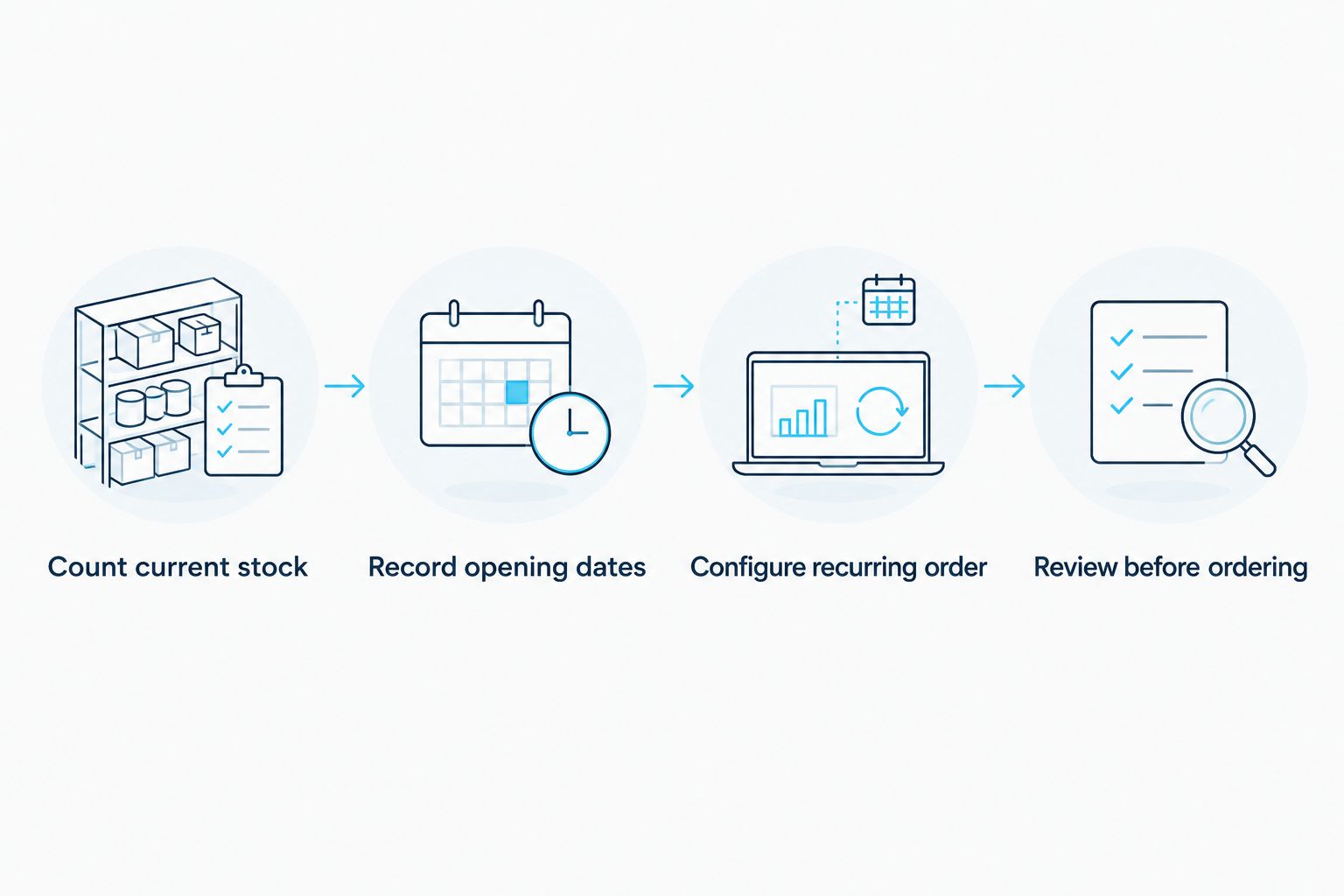
- Count current stock. Bring together unopened containers and check partially used bottles in bathrooms, the kitchen, and utility areas. Count refills separately from ready-to-use bottles.
- Record the exact item. Include the product name, formulation, package size, intended surface, and where you store it. Similar packaging is not enough to establish that two cleaners are interchangeable.
- Assign an owner. Choose one household member to manage recurring orders. Other people can flag low stock without starting another subscription.
- Record opening dates. Note when you start each container and when it runs low. Those observations give you a basis for selecting an interval instead of guessing.
- Exclude uncertain items. Leave unfamiliar products and rarely used cleaners off auto-delivery until you know they fit your surfaces and routine.
Expected result: You have a short list of exact products, a stock count, and one person responsible for replenishment.
Keep this list somewhere the household can find it. A shared note works; a spreadsheet is optional. You are managing a cupboard, not opening a warehouse.
Set your reorder rule
- Choose the trigger. For a scheduled shipment, the trigger is the recurring date. For a stock-check reminder, the trigger is your inspection followed by a decision to order.
- Use observed consumption. Base the delivery interval on how long your household takes to use the exact package you selected. Do not copy an interval from another household.
- Allow for delivery time. Use the retailer’s current delivery estimate when deciding how much supply you need before the next shipment arrives.
- Set a stock ceiling. Decide how much unopened product you can safely store. Once you reach that ceiling, review the next shipment rather than accepting another container by habit.
Expected result: Every item has a clear ordering method, a reason for its timing, and a limit that prevents unnecessary accumulation.
Recurring-delivery configuration
Retailer screens differ, so use the wording shown in your account rather than looking for a universal button name. The steps below describe the settings to verify; they are not labels for a particular store.
Configure the recurring order
- Open the exact product listing. Match the formulation and package size to your supply list. Check the product label’s surface guidance before committing to repeat deliveries.
- Choose the recurring-delivery option. Use it only when the retailer offers it for that exact item. A saved cart or shopping list does not place repeat orders.
- Set quantity and interval. Select the amount you actually need and an interval supported by your usage notes. If the choices do not fit, use a reminder instead.
- Review the first order separately. Read the order summary to distinguish the initial shipment from later recurring shipments. Confirm the address, item, quantity, and next scheduled date.
- Read the recurring-order terms. Find the change deadline and the instructions for skipping, rescheduling, or ending future orders before you activate the arrangement.
- Complete the retailer’s confirmation step. Return to the account’s recurring-order area afterward and verify that the arrangement appears there.
Expected result: Your retailer account shows the intended product, quantity, delivery interval, and next scheduled order. A product sitting in a cart does not pass this check.
Save the confirmation somewhere accessible to the person managing supplies. For each recurring order created in 2026, record which retailer account controls it; an email receipt alone is not a management plan.
Configure the review reminder
- Create a pre-order stock check. Put it before the retailer’s change deadline, leaving yourself time to act. As a starting routine, review stock 7 days before the scheduled order, then adjust if the retailer requires an earlier decision.
- Name the reminder clearly. Include the product and the action: check stock, inspect the next order, and change it if needed.
- Add the stock ceiling. Put your maximum unopened quantity in the reminder notes so another household member can make the same decision.
- Check notification delivery. Confirm the reminder reaches the responsible person and that retailer messages are not buried in an unused inbox.
Expected result: You receive a prompt early enough to change the next shipment, with enough detail to make the decision without hunting through old messages.
First-cycle checks
Verify the setup before expanding it
- Check the order record. Confirm that you created a recurring arrangement rather than only a one-time purchase. Verify the next scheduled date in the retailer account.
- Inspect what arrives. Match the delivered formulation, package size, and quantity against your list. Follow the retailer’s process if the delivered item differs.
- Update household stock. Record the new containers and opening dates. Avoid hiding a refill behind unrelated supplies where nobody will find it.
- Review after 2 delivery cycles. Use this suggested checkpoint to compare remaining stock with incoming quantities. Extend the interval if supplies accumulate; shorten it only when your usage supports the change.
Expected result: You have checked both the account setup and the physical delivery before adding more products.
Do not place an unnecessary extra order just to test the process. The account record, notifications, and first planned delivery provide the checks you need.
For the rest of 2026, keep changes simple: alter one product’s quantity or interval at a time. That makes it easier to tell whether the adjustment solved the problem.
Reorder when you open the last spare
If your household’s usage changes frequently, use an event-based routine instead of a fixed shipment. Opening the last spare container is a useful prompt to review replenishment, not proof that every product needs an immediate order.
- Choose the event. Ask whoever opens the last spare to update the shared shopping list or notify the person managing orders.
- Check remaining coverage. Compare the newly opened container with your observed usage and the retailer’s current delivery estimate.
- Review existing orders. Check whether a recurring shipment or another household member’s order already covers the need.
- Order or defer deliberately. Place the order when needed, or set a reminder to revisit it before your remaining supply runs out.
This version reduces dependence on memory, but it is not fully automatic checkout. Genuine stock-triggered purchasing requires an inventory system connected to an ordering system; a calendar reminder alone cannot provide that connection.
For households sharing chores, the strongest part of this routine is the handoff. Nobody needs to become the household’s full-time bottle detective.
Troubleshooting
Supplies keep piling up
Check every storage location before changing the subscription. Then review the next shipment and reduce its quantity, extend its interval, or use the retailer’s skip option where offered. Remove duplicate subscriptions rather than trying to balance them against each other.
You run out before the next shipment
Verify that the package size matches your usage notes and that the order was completed. Review whether household consumption changed, then adjust the interval or keep a safely stored reserve appropriate to your observed needs.
The recurring order contains the wrong item
Compare the formulation and package size, not just the product name. Stop future repeats of the incorrect item through the retailer’s account controls, and follow the retailer’s instructions for resolving the existing order. Do not use an unfamiliar formulation on a surface without checking its label.
Two people order the same supplies
Put all recurring arrangements on the shared list and assign one manager. Before anyone places an extra order, check both unopened stock and pending orders. A shared shopping list helps only when everyone uses it.
Your cleaning visit moves, but your shipment does not
Treat the appointment and supply order as separate schedules. Review each independently when plans change; do not assume rescheduling residential cleaning updates a retailer account. Order according to household use, not a visit date alone.
Customize your workflow
Once the first products are running smoothly, add items individually and keep the same checks. Group them by how they are used—daily upkeep, occasional tasks, and supplies specifically requested for a visit—rather than giving everything the same delivery interval.
For a useful starting list, see the cleaning supply checklist for between-visit upkeep. Confirm what belongs in your home before automating its arrival.
Porch and Parlor Cleaning provides residential cleaning, while retailer auto-delivery handles repeat product orders. The benefit of keeping those jobs separate is clear ownership; the drawback is that you must review both arrangements when your routine changes.
Before adding supplies for a professional visit, ask the service what you need to provide. That keeps your 2026 routine tied to actual needs instead of assumptions.
FAQ
What's the best way to automatically reorder cleaning supplies?
Use a retailer’s recurring-delivery feature for products with predictable household usage. Choose the exact formulation and package size, then review stock before the next order repeats.
Can a cleaning appointment automatically trigger a supply order?
A cleaning appointment does not, by itself, trigger a retailer order. Keep supply replenishment separate unless you have explicitly configured and verified a connection between the scheduling and ordering systems.
Is a stock-check reminder better than auto-delivery?
A stock-check reminder is better for products you use unevenly; auto-delivery suits steady consumption. The reminder requires you to order, while auto-delivery requires you to prevent unnecessary repeats.
How often should I schedule cleaning supply deliveries?
Schedule deliveries around your household’s observed use of the exact package size. Record opening dates and check remaining stock before selecting or changing an interval.
Do I need to buy supplies before Porch and Parlor Cleaning visits?
Confirm supply requirements directly with Porch and Parlor Cleaning before buying products for a visit. Ask what you need to provide and discuss any surface-specific products or household preferences.
How do I prevent duplicate cleaning supply orders?
Assign one person to manage recurring orders and maintain a shared record of stock and pending deliveries. Check that record before anyone places an additional order.
Should I automatically reorder every cleaning product?
No—reserve automatic ordering for familiar products with predictable use. Use stock checks for occasional-use cleaners, and verify surface compatibility before repeating any product purchase.
One last thing
Track when you open a bottle, not just when you throw it away. The opening date starts your usage record while you still have product left; the empty bottle only tells you that the cupboard has already lost the argument.
Keep that habit even after the deliveries feel routine. Automatic ordering handles the repeat purchase, but your opening dates tell you whether the schedule still fits.