Instead of copying clubhouse requests from emails into a calendar, build an HOA shared space cleaning schedule that moves each request through approval, provider confirmation, and a protected cleaning window. Keep those stages separate so a room reservation never masquerades as a booked cleaner.
- An HOA shared space cleaning schedule should separate room reservations, cleaning requests, and confirmed appointments.
- Porch and Parlor Cleaning offers residential cleaning; confirm shared-space scope before requesting an HOA appointment.
- Use a shared calendar and request register before adding booking automation.
- Update existing cleaning records when reservations change instead of creating duplicate jobs.
Why this matters
A resident reserves the community room. Someone forwards the email, someone else assumes cleaning is covered, and Monday morning delivers a sticky surprise. A reservation records room use; it does not confirm cleaning.
Your schedule needs a visible handoff between the person approving the request and the provider accepting the work. This guide uses a provider-neutral request register and shared calendar, not an assumed connection to a booking platform.
Porch and Parlor Cleaning is best suited to greater Nashville homeowners seeking residential cleaning booked online. Its stated offering is residential home cleaning, so review the cleaning services and confirm the proposed shared-space work before treating it as an HOA provider. Online booking alone does not establish commercial scope or an HOA integration.
For your 2026 setup, start with a process people can check. Add automation only after approval, scope, and confirmation work reliably.
Before you start
- Get the right access. You need permission to review room reservations, edit the cleaning calendar, and maintain a shared request register. Name an HOA approver and a backup; do not make every resident a schedule editor.
- Gather the working details. Collect room names, event end times, next-use times, approved cleaning tasks, provider contact details, and access arrangements. Use a spreadsheet or an existing request system your association already controls.
- Confirm the non-obvious gotcha: booking authority. Permission to reserve a room is not permission to authorize cleaning work. Confirm who approves the work and whether the provider accepts that space before sending appointment requests. Keep door codes out of resident-visible calendars.
The field names below are labels to create in your own template, not claims about buttons or settings in an HOA portal or BookingKoala. Keep your existing software if it supports the same information; there is no need to move the whole neighborhood into a new app.
Choose your scheduling approach
Use one of these approaches for the handoff between approved requests and confirmed cleaning. Both need an accountable person.
| Approach | Best for | Main advantage | Limitation |
|---|---|---|---|
| Coordinator-managed handoff | Associations starting with email requests and a shared calendar | A person checks scope, approval, and timing before requesting service | The coordinator must record confirmations and changes |
| Connected request workflow | Associations whose existing systems support the required triggers and updates | Supported connections can carry request details between systems | Connections need testing, permissions, and exception handling; calendar creation still does not prove provider acceptance |
Start with the coordinator-managed handoff. Move to a connected workflow only when you can identify the supported connection, its permissions, and its behavior when a request changes. Do not mistake a calendar subscription for two-way appointment management.
Request register
Create the approval record
- Create a shared register named Shared Space Requests — 2026. Restrict editing to the coordinator, approver, and backup; give others only the access their role requires.
- Add Request ID, Space, Requester, Event start, Event end, Next use, and Requested tasks. Give every submission a unique Request ID and keep it unchanged throughout the job.
- Add Approval status, Approver, Provider status, Appointment reference, and Access owner. Keep approval and provider status in separate fields.
- Define your own status values. For approval, use Pending, Approved, or Declined. For the provider, use Not requested, Requested, Confirmed, or Change needed.
- Require the approver to check the requested work before marking it Approved. A vague request such as “clean everything” goes back for clarification rather than straight into booking.
Expected result: every proposed cleaning has a stable identity, a named decision-maker, and an approval status. You can distinguish an approved request from an accepted appointment without reading an email chain.
Write tasks in ordinary language: remove event trash, clean agreed tables, or clean agreed restroom surfaces. These are examples for defining scope, not promises that any particular provider includes them. Record exclusions too, especially furniture moving, outdoor work, or unusual waste.
Cleaning calendar
Reserve the room and cleaning window
- Create a shared calendar named Shared Space Cleaning — 2026. Keep its editing permissions narrower than the resident reservation calendar.
- Add a proposed cleaning block only after HOA approval. Start its title with Requested, followed by the space name and Request ID.
- Set the proposed start after the event ends and after the organizer's agreed pack-up period. Obtain the cleaning duration from the provider's assessment of the actual work; do not borrow a duration from another room.
- Check the block against the next reservation, setup time, maintenance visits, and access restrictions. If the work does not fit, resolve the conflict before requesting the appointment.
- Put the approved task summary and coordinator contact in the restricted job record. Keep the shared calendar description limited to information its viewers need.
Expected result: the calendar shows when cleaning is proposed and when the room must remain unused. It does not yet tell residents that a cleaner has accepted the job.
For example, imagine an event ends at 6 p.m., the organizer finishes packing at 7 p.m., and the next reservation starts at 8 p.m. The usable gap is 1 hour, not the entire period after the event. Those are example times, not a cleaning-duration recommendation; the provider must confirm whether the actual scope fits.
An event organizer also needs to know that the room stays unavailable during cleaning. Otherwise, chairs and party decorations tend to wander back in just as the floor gets attention.
Provider confirmation
Turn the request into a confirmed appointment
- Send the approved scope through the provider's agreed booking or communication channel. Include the Request ID, exact space, proposed window, access contact, and next-use deadline.
- Leave Provider status as Requested while awaiting acceptance. An outgoing email, submitted form, or internal calendar entry is not sufficient confirmation.
- Once the provider accepts the work and timing, enter the Appointment reference and change Provider status to Confirmed. Record any scope changes alongside the approval record.
- Update the existing calendar title from Requested to Confirmed. Keep the same Request ID so residents and coordinators can match the appointment to the original request.
- Confirm how the cleaner will enter and who handles an access problem. Share sensitive entry information through an appropriately restricted channel, not the public event description.
Expected result: each confirmed calendar block points to an accepted appointment and an approved scope. Unconfirmed work remains visibly unconfirmed.
Porch and Parlor Cleaning uses a BookingKoala-powered scheduling site for residential bookings. That fact does not establish support for HOA requests, shared-room cleaning, or automated appointment creation. Ask about the actual space and workflow through the contact page before building a process around those assumptions.
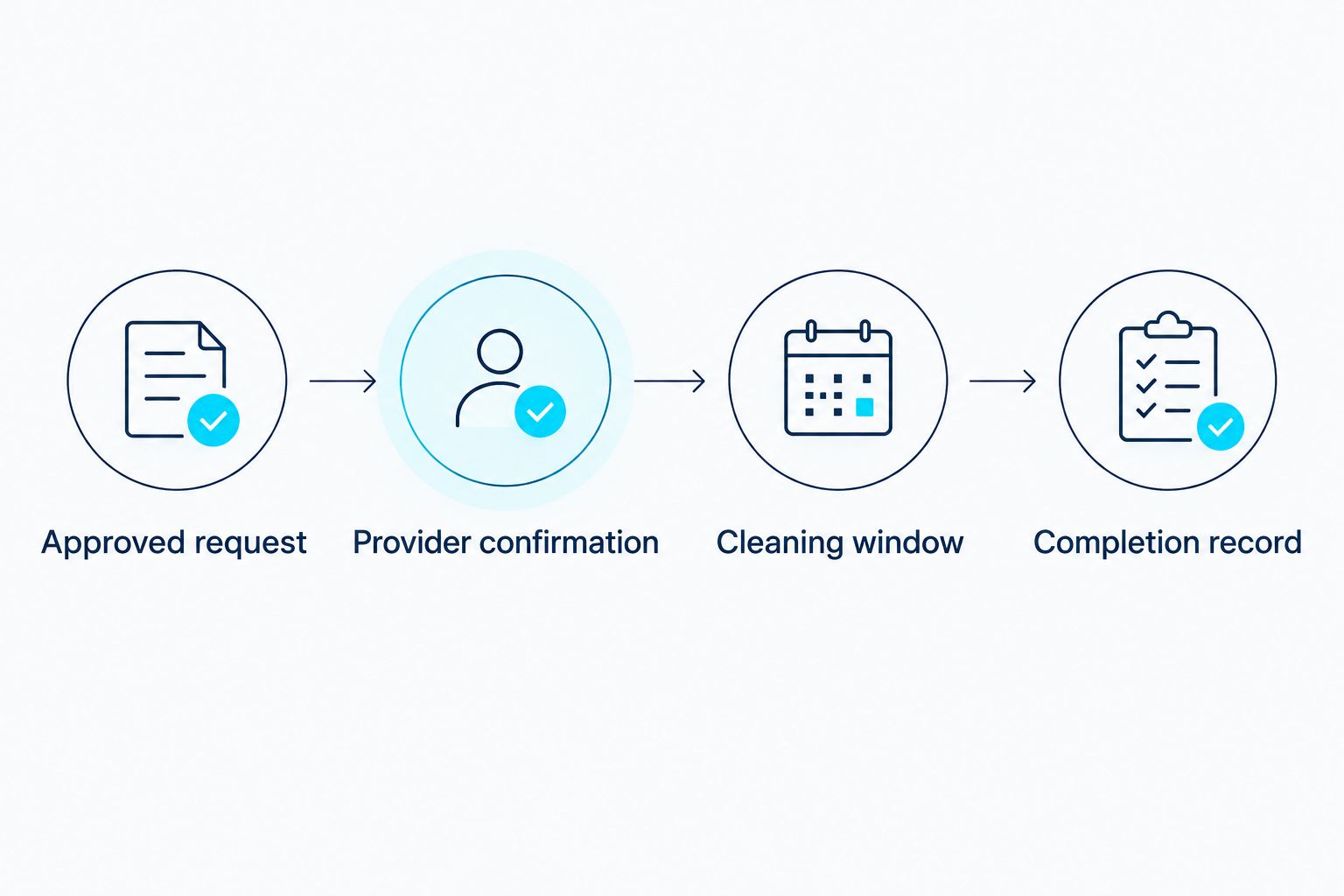
For your 2026 handoff, keep the sequence simple: Approved request, Provider confirmation, Cleaning window, Completion record. Each stage should leave evidence the next person can check.
Completion record
Close the job and test the handoff
- Add Completion status, Completed at, and Follow-up to your register. Keep completion separate from the provider's appointment acceptance.
- Agree with the provider on how completion will be reported. Ask the coordinator to record that report rather than assuming a calendar block ending means the room is ready.
- Record any unfinished agreed tasks or access failures in Follow-up. Assign a person to resolve them before releasing the space for its next use.
- Run a clearly marked practice request through approval and calendar creation without submitting a real service booking. Check that the backup coordinator can follow the record without asking the original organizer what happened.
- Test a date change and cancellation in the internal records. Confirm that each action updates the existing Request ID rather than producing another live job.
Expected result: your HOA can distinguish requested, confirmed, completed, and unresolved work. A substitute coordinator can pick up the process without detective work.
For the first live request in your 2026 register, review the handoff with the approver and provider. Correct confusing labels immediately. A tidy spreadsheet is useful, but a shared understanding of what its labels mean does the heavy lifting.
Update cleaning whenever a room reservation changes
A changed event needs a changed handoff, not a second booking. Use this adjacent workflow for moved dates, longer events, room swaps, and cancellations.
- Find the existing Request ID when the reservation changes. Update the event details in that record rather than creating another request.
- Mark Provider status as Change needed if the accepted timing or scope is affected. Flag the calendar entry so nobody relies on the old arrangement.
- Send the proposed change to the provider through the agreed channel. Treat the revised appointment as unconfirmed until the provider accepts it.
- Update the same calendar block after confirmation. For a cancellation, record the provider's acknowledgment and handle the appointment under the provider's actual terms.
If your systems support automation, use the Request ID as the matching key and configure updates against the existing record. Route missing matches and failed updates to a person. Never let a reservation edit silently create an additional cleaning appointment.
Recurring cleaning needs the same discipline. Keep the routine appointment separate from extra event cleanup, then check whether both are needed before requesting additional work.
Troubleshooting
Two cleaning jobs appear for one event
Match both records against the Request ID and appointment references. Confirm with the provider which appointment remains active before removing an internal duplicate; deleting a calendar entry alone does not cancel service.
The room is reserved during the proposed cleaning window
Check the organizer's pack-up time and the next user's setup time, not just event start and end times. Resolve the room conflict and obtain provider acceptance of the revised window before marking it confirmed.
The calendar says confirmed, but the provider has no booking
Return the record to Requested and find the actual confirmation evidence. Ask the provider to verify the appointment, then correct the process so only an accepted booking can receive the confirmed label.
The cleaner cannot enter the space
Contact the named Access owner and follow the agreed access procedure. After resolving the immediate problem, update the restricted job instructions and check that the backup contact knows their role.
A canceled event still has cleaning attached
Check whether cleaning is still required and contact the provider about the existing appointment. Record the response; removing the resident reservation does not communicate a cancellation to a separate booking system.
Customize your workflow
Expand the process by space before adding more software. A lounge and a shared restroom need distinct task descriptions, even when the same coordinator handles both. Keep one approval record per job and make the space name unmistakable.
For recurring work, define the baseline scope separately from event-related requests. A routine visit should not quietly absorb extra tasks without agreement, and an event should not automatically trigger duplicate cleaning.
Keep your 2026 workflow review focused on useful questions: Was the work approved? Did the provider accept it? Was access ready? Was completion recorded? Fix the first broken handoff before adding another notification.
Homeowners coordinating their own residential cleaning can use Porch and Parlor Cleaning's online booking route. HOA coordinators should first establish shared-space suitability and the provider's accepted communication process; the residential offering does not establish an HOA service agreement.
FAQ
What's the simplest way to build an HOA shared space cleaning schedule?
Use a shared request register and calendar with separate approval and provider-confirmation fields. Assign a coordinator to move approved requests into accepted appointments and record completion.
Does reserving the clubhouse automatically book a cleaner?
No. A clubhouse reservation records room use, while a cleaning appointment requires a separate accepted booking unless an explicitly supported process connects them.
Can I connect HOA requests directly to BookingKoala?
Direct connection support must be confirmed for the actual account and request system. Porch and Parlor Cleaning's use of BookingKoala for residential scheduling does not establish an HOA integration.
Should HOA cleaning happen before or after an event?
Schedule cleaning around the approved purpose of the visit, whether preparation or post-event cleanup. For post-event work, allow the organizer to finish packing and confirm that cleaning fits before the next room use.
Who should approve a shared-space cleaning request?
The HOA should designate an approver with authority to authorize the work. Keep that approval separate from the resident's permission to reserve the room and the provider's acceptance of the appointment.
What should happen when a resident changes an event time?
Update the existing request and obtain provider acceptance of any affected appointment change. Keep the same Request ID and calendar block so the change does not produce a duplicate job.
Can residents see door codes in the cleaning calendar?
Keep door codes out of resident-visible calendar entries. Share access details only with authorized people through an appropriately restricted channel and name an access contact for the appointment.
One last thing
An empty room is not necessarily a ready room. The event can be over, the cleaner can have left, and an unresolved task can still block the next reservation. Release the space based on the completion record, not simply because the clock passed the appointment's end time.
Give your backup coordinator a practice request and ask them to explain its status using only the register. If they need the original email sender to translate it, simplify the handoff.