Instead of juggling grocery bags while someone cleans your kitchen, arrange grocery delivery after the cleaning visit and assign someone to put cold food away. This 2026 guide shows you how to connect the schedules with calendar reminders—not an assumed connection between your grocery account and cleaning booking.
- Grocery delivery timed with house cleaning works best after the visit, with someone ready to unpack.
- Porch and Parlor Cleaning provides residential cleaning for greater Nashville homeowners; coordinate grocery delivery separately.
- Keep cleaning confirmations and grocery order confirmations separate, even when both appear on your calendar.
- Refrigerate perishables promptly; a clean kitchen is not a reason to leave cold food outside.
Why this matters
A grocery delivery and a cleaning visit both need access to the kitchen. Schedule them together without a handoff plan, and your counters become a loading dock just when someone needs to wipe them.
Porch and Parlor Cleaning is best for greater Nashville homeowners seeking book-online residential cleaning. Start with your confirmed appointment through Porch and Parlor Cleaning, then arrange the grocery order around it. Online cleaning booking does not establish a connection to a separate delivery account.
For your 2026 household routine, the goal is simple: clear surfaces during cleaning, groceries afterward, and no mystery about who answers the door.
Before you start
- Gather both confirmations. You need access to your cleaning booking details, your grocery account, and a calendar you can edit. Have the service address and delivery instructions ready.
- Choose a receiving person. Identify who will accept the delivery, handle any required handoff, and refrigerate perishables. Do not assign this to the cleaner without an explicit agreement.
- Check the timing gotcha. A cleaner's arrival window is not a finish time. Confirm the expected visit length before selecting delivery, and check the grocery provider's rules for changing an order.
Do not buy a narrow delivery window based only on when cleaning starts. That is how the frozen peas end up waiting for the mop.
Cleaning appointment setup
Use the confirmed cleaning appointment as the starting point. A calendar entry records your plan; it does not book, change, or cancel either service.
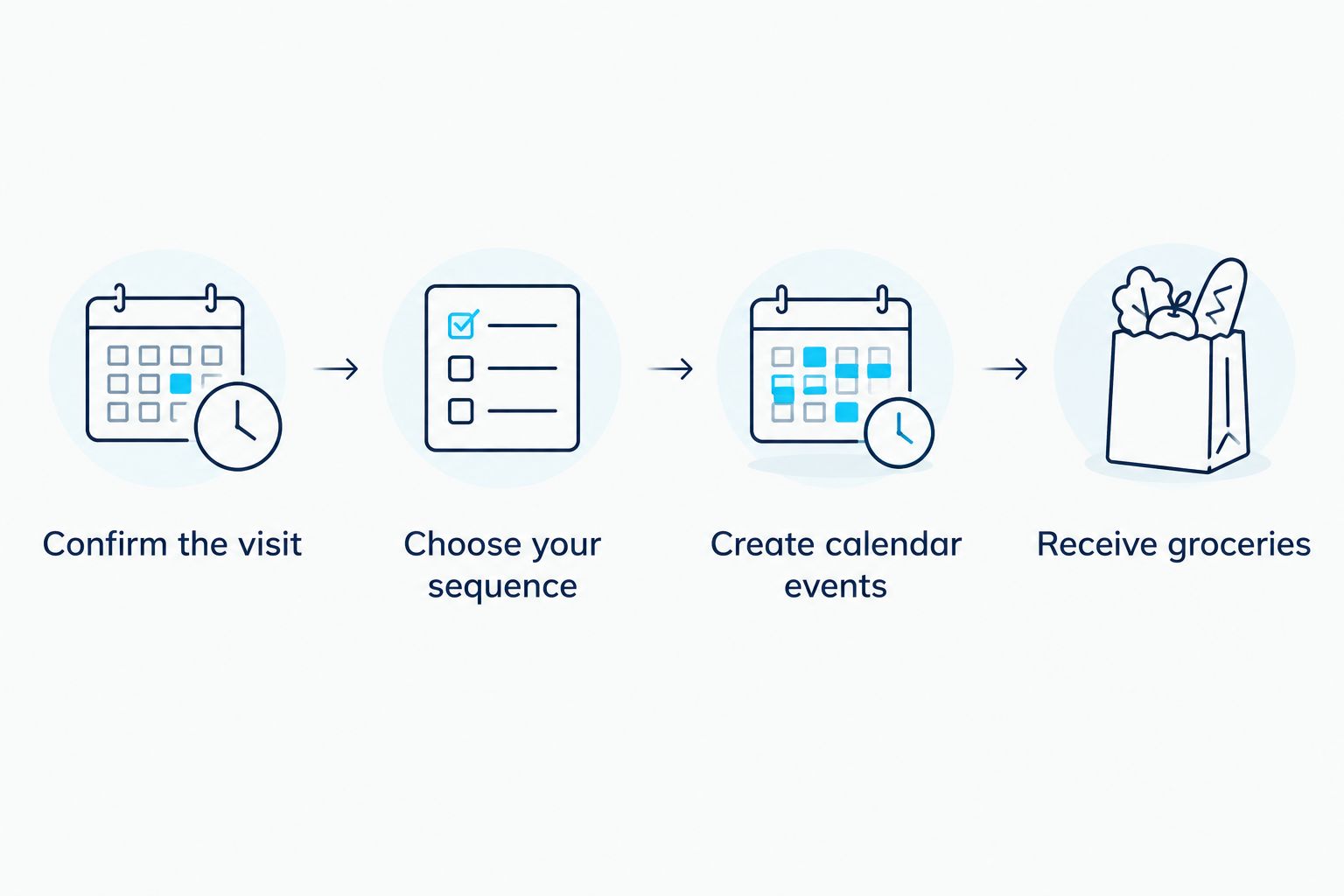
Confirm the visit details
- Open your cleaning confirmation and check the date, address, and arrival window.
- Ask the cleaning service about the expected visit length if the confirmation does not establish it. Treat an estimate as an estimate, not a guaranteed departure time.
- Confirm the kitchen work you have requested. Do not assume that refrigerator interiors, pantry organization, or grocery handling are included.
- Choose the delivery sequence below before placing your grocery order.
Expected result: You know when cleaning is scheduled, what kitchen work is agreed, and which timing details still need confirmation.
Choose your delivery sequence
Delivery after cleaning is the best default. It keeps grocery bags off working surfaces and lets you unpack without moving around cleaning equipment. The downside is that someone still needs to be home afterward.
| Sequence | Best for | Advantage | Trade-off |
|---|---|---|---|
| Delivery after cleaning | Households with someone home afterward | Keeps groceries out of the cleaning workspace | Needs enough separation for a visit that runs longer |
| Delivery before cleaning | Households that can unpack everything first | Gets groceries stored before the visit | Bags, boxes, and food must be cleared before cleaning |
| Delivery on another day | Households without a reliable receiving person | Removes the same-day scheduling conflict | Requires a separate household task |
Skip an intentional overlap unless you have a workable receiving area and an agreed plan. The cleaner's presence is not a substitute for a grocery recipient.
Calendar and reminder setup
A shared calendar makes the sequence visible. Google Calendar is one way to record it; this workflow uses calendar reminders rather than a direct BookingKoala-to-grocery integration.
Create the cleaning event
- In Google Calendar on the web, select Create, then Event.
- Enter a clear title, such as House cleaning—confirmed appointment. Set the date and time from your confirmation.
- In Description, record the arrival window, expected duration if confirmed, and who will handle household access. Keep entry codes out of a broadly shared calendar.
- Use Add notification to create a preparation reminder. Choose a time when you can actually clear counters, not when you are already leaving the house.
- Select Save.
Expected result: Your calendar contains the cleaning appointment and a reminder to prepare the kitchen. The original service confirmation remains the source of truth.
Create the grocery handoff event
- Place the grocery order through your provider and select a delivery window that fits the cleaning plan.
- Read the order confirmation before adding it to your calendar. Record the confirmed window, not the time you hoped to get.
- In Google Calendar, select Create, then Event. Name it Grocery delivery—recipient home and enter the full delivery window.
- In Description, record the recipient's name and your fallback if the cleaner is still working. Add the household member through Add guests if that person needs the event.
- Use Add notification for a reminder to check the order's current timing, then select Save.
Expected result: Both events are visible, and the grocery event identifies a real person responsible for receiving food.
For this 2026 setup, use different event names even when the appointments fall on the same day. Two separate confirmations deserve two separate calendar entries.
Kitchen and delivery handoff setup
The schedule is only half the job. Your kitchen also needs a clear place to receive groceries without blocking unfinished work.
Prepare the kitchen
- Clear counters. Put away dishes, paperwork, and small loose items before the cleaning visit. Leave the agreed work areas accessible.
- Make refrigerator space. Check what needs using or discarding before the delivery arrives. Do not empty refrigerated food onto the counter to wait through the visit.
- Choose a landing spot. Pick a dry, clear surface for bags after cleaning. Keep the doorway and any wet floor areas out of the unloading route.
- Check instructions. Give the delivery provider directions for finding your entrance through its supported instructions. Never assume notes sent to the cleaner also reach the driver.
- Name the recipient. Make sure that person can answer delivery messages and put the order away.
Expected result: The cleaner has usable work surfaces, and the recipient knows where groceries will go.
Put food safety ahead of the schedule
Unpack refrigerated and frozen groceries promptly, even if cleaning runs late. Under USDA food-safety guidance, keep your refrigerator at 40°F or below. Perishable food should not remain unrefrigerated for more than 2 hours, or 1 hour when the temperature is above 90°F.
Those are safety limits, not suggested waiting periods. Do not plan for milk or meat to sit outside until the kitchen looks ready.
If groceries arrive during cleaning, tell the cleaner you need access to cold storage. Put perishables away first, then move empty bags and packaging out of the workspace. Do not ask anyone to hurry across a wet floor.
When your cleaning appointment changes
For a recurring 2026 routine, repeat the preparation reminders—not an assumption that the delivery will always follow the same schedule. A changed cleaning event does not change an existing grocery order.
- Open the cleaning service's updated confirmation and verify the new date and arrival details.
- Open the existing cleaning calendar event, update it, and select Save. For a repeating event, choose the occurrence or series you actually intend to change.
- Open your grocery order separately. Check whether its delivery window can still be changed, then follow the provider's current instructions.
- Update the grocery calendar event only after the provider confirms the change. Tell the recipient if the handoff time has moved.
Expected result: Your booking confirmation, order confirmation, and calendar agree. If the order cannot move, arrange a recipient or separate the appointments rather than leaving food unattended.
A recurring reminder without a recurring order
Use a repeating calendar reminder to review groceries before cleaning day. That is useful even when you order different items each time.
Name the reminder Check groceries and cleaning. Use it to inspect the fridge, confirm the next cleaning visit, and decide whether delivery belongs on that day at all. A reminder prompts a decision; it does not place an order or reserve a delivery window.
Troubleshooting
The cleaner is still working when groceries arrive
Receive the order yourself and store cold food first. Ask which kitchen area is safe to use, and keep bags away from unfinished surfaces. For the next visit, select a later window or a different day rather than repeating the collision.
The delivery arrives earlier or later than expected
Check the provider's current order status and contact the designated recipient. If delivery timing no longer fits, use the provider's supported change or support process. Do not treat an unattended doorstep as refrigerated storage.
Nobody is home to put groceries away
Move the delivery if your provider permits it, or arrange a trusted recipient before it arrives. Do not assume Porch and Parlor Cleaning's residential cleaning service includes accepting deliveries, unpacking food, or monitoring order messages.
Your calendar changed, but the bookings did not
Open each service's actual confirmation and correct the appointment or order there first. Then update the calendar. A calendar edit is a planning change, not proof that a business received a rescheduling request.
Bags block the kitchen or entrance
Store the food, clear the packaging, and reopen the walkway. If this keeps happening, choose delivery after the visit or on another day. No calendar trick fixes a hallway full of grocery bags.
Customize your workflow
Once the basic order works, share responsibility instead of adding more notifications. One household member can check the cleaning confirmation while another handles the grocery handoff; both should know who is responsible for cold food.
For a repeatable 2026 calendar, follow the guide to connecting Google Calendar to your recurring cleaning schedule. Keep preparation reminders separate from the appointment so you can change the reminder without confusing it with a booking change.
Porch and Parlor Cleaning handles residential cleaning bookings online. Keep grocery scheduling in your delivery account, and confirm any request beyond cleaning directly with the service before building it into your routine.
FAQ
What's the best way to arrange grocery delivery timed with house cleaning?
Schedule grocery delivery after the cleaning visit and have someone ready to unpack. Confirm the expected cleaning duration first, because an arrival window does not establish a finish time.
Can I automatically connect my grocery account to my cleaning booking?
Use separate confirmations and calendar reminders for this workflow. Do not assume your grocery provider and cleaning booking exchange schedule changes; verify any integration with both providers before relying on it.
Should groceries arrive before or after the house cleaner?
After cleaning is the best default because bags and unpacking stay out of the workspace. Delivery before cleaning also works when you can store all food and clear the packaging before the visit.
Can my cleaner put grocery deliveries away?
Do not assume grocery unpacking is included in a cleaning appointment. Arrange your own recipient unless the cleaning service explicitly agrees to that task.
What should I do if groceries arrive while the kitchen is being cleaned?
Receive the order and refrigerate perishables promptly. Coordinate safe access to the refrigerator with the cleaner, then keep bags and packaging out of unfinished work areas.
How long can refrigerated groceries stay out?
USDA guidance limits unrefrigerated time for perishable food to 2 hours, or 1 hour above 90°F. Put cold groceries away promptly rather than treating those limits as planned waiting time.
Does changing my calendar reschedule my grocery delivery?
No—editing the calendar entries in this workflow does not reschedule the underlying services. Change the grocery order through its provider, confirm the new window, and then update your calendar.
One last thing
Choose the grocery window around the person putting food away, not just the person cleaning. That is the detail that makes the whole plan work.
For your next 2026 cleaning day, ask one question before submitting the grocery order: who will open the door and put the cold food away? If the answer is nobody, choose another delivery time. Your freshly cleaned kitchen can wait for its groceries.