Instead of texting your pet sitter every cleaning day, schedule pet care around the cleaner’s confirmed arrival window and keep the handoff instructions in a shared calendar event. To schedule pet sitter around house cleaning without a door-opening scramble, arrange pet pickup before the earliest expected arrival and require a return check before pets come home.
- To schedule pet sitter around house cleaning, confirm the cleaning window before arranging pet pickup.
- Porchandparlorcleaning offers online-booked residential cleaning for greater Nashville homeowners; coordinate pet care separately.
- Use a shared calendar for appointment details, but require direct confirmation when either visit changes.
- Keep pets away from active cleaning areas until surfaces are dry and product-label reentry instructions are satisfied.
Why this matters
Your cleaner needs access to the house. Your sitter needs clear responsibility for the pet. Neither appointment automatically settles who opens the door, handles a late return, or checks whether a freshly cleaned room is ready for paws.
Porchandparlorcleaning residential cleaning is best for greater Nashville homeowners who want to book home cleaning online. Pet-sitter coordination belongs in your household plan, rather than in an assumed connection between booking systems. Start with your confirmed appointment from Porchandparlorcleaning, then build the pet-care arrangement around it.
For your 2026 household calendar, make the confirmed cleaning window the starting point. A calendar invitation shares information; it does not book a sitter, change a cleaning appointment, or prove that either person has accepted new instructions.
Before you start
- Gather confirmed appointment details. Have the cleaning date, arrival window, address, sitter’s contact information, and your own reachable phone number. Confirm whether the sitter can cover the full period you need, not just a short walk.
- Arrange access and pet care. Decide who handles keys or authorized entry, where the pet will stay, and who supplies water, a leash, carrier, or other familiar essentials. Keep feeding and medication instructions with the person responsible for pet care.
- Check the timing gotcha. An arrival window is not a finish time. Ask about the expected scope and timing, then arrange a fallback if cleaning takes longer than expected. Never assume the cleaner will supervise your pet after the sitter leaves.
Choose a pet-care arrangement before creating reminders. The calendar should describe a workable plan, not dress up a timing conflict.
| Arrangement | Best for | Advantage | Limitation |
|---|---|---|---|
| Sitter takes the pet out | Pets comfortable leaving with their sitter | Separates pet movement from cleaning activity | Requires coverage beyond a brief walk if cleaning continues |
| Sitter stays in a designated room | Pets that need to remain at home | Keeps a familiar person nearby | That room needs an agreed cleaning or exclusion plan |
| Visits happen on separate days | Households without reliable same-day coverage | Removes the sitter-cleaner handoff | Does not provide pet supervision during cleaning |
Choose off-site care only when it suits your pet and the sitter can cover the cleaning period. For pets staying home, agree on a closed-room plan with the cleaning provider first. A friendly dog is still a dog with opinions about the vacuum.
Cleaning appointment details
These instructions use Google Calendar on desktop for household coordination. They do not require a connection to BookingKoala, and they do not change your service booking.
- Confirm the cleaning appointment directly. Use the date and arrival window supplied for your booking. If you have only requested a visit, wait for confirmation before treating the time as settled.
- Open Google Calendar and select Create, then Event. In Add title, enter a recognizable household label such as Cleaning day — pet care coordination. Avoid putting entry codes or private medical information in the title.
- Set the event’s date and time. Represent the confirmed arrival window accurately. Put any estimated completion information in the description and identify it as an estimate, rather than presenting it as a guaranteed finish.
- Use Add description to record the essentials. Include the appointment status, rooms involved, pet-care arrangement, responsible contact, and what happens if the schedule changes. Add the year to any date written in the notes so a reused 2026 entry stays clear.
- Select Save. Check the event against the booking confirmation before sharing it with anyone else.
Expected result: You have a calendar record that matches the cleaning appointment, with estimates clearly separated from confirmed details.
Keep the booking confirmation as the source for service details. The calendar is your coordination copy. If those records disagree, resolve the difference with the provider before asking the sitter to commit.
Pet-care coverage and handoff
Build the sitter’s visit around the actual cleaning arrangement, not around how long you hope the job will take. Include travel, pickup, and the return decision when discussing coverage.
- Request the sitter’s coverage directly. Explain whether you need a walk, off-site supervision, or in-home care. Confirm the arrangement through the sitter’s usual booking or communication method.
- Create a separate pet-care event. Use Create, then Event, and enter Pet pickup and return in Add title. Separate events let you see when the sitter’s coverage starts and ends without confusing it with the cleaner’s arrival window.
- Choose a pickup margin. For example, propose pickup 30 minutes before the earliest cleaning arrival, then adjust it to the sitter’s route and your pet’s needs. This is a planning choice, not a required service interval.
- Record the handoff rule in Add description. State who secures the pet, which entrance the sitter uses, and who checks that the pet is out before cleaning begins. For an at-home arrangement, name the designated room instead.
- Assign return approval. Choose yourself or another authorized household adult to confirm that the pet can return. Give the sitter a fallback instruction if that person cannot be reached.
Expected result: Someone has explicitly accepted responsibility for the pet throughout the agreed coverage period, including the handoff.
Do not put a fixed pet-return time on the calendar unless you also have a plan for unfinished cleaning. If the sitter cannot extend care, arrange an authorized household member or another suitable pet-care option beforehand.
Shared instructions and reminders
Share only what each person needs. Your sitter needs pet-care instructions; your cleaner needs to know where the pet will be and which spaces are accessible. Neither needs your entire household calendar.
- Open the coordination event and use Add guests. Invite your sitter only after the sitter agrees to use email invitations. Invite another household adult if that person handles the handoff. Do not add service providers without their agreement.
- Write short, action-based notes. Cover pickup, pet location, access responsibility, return approval, and the fallback contact. Send sensitive access details through an agreed private channel rather than a broadly shared event.
- Choose Add notification for your own reminders. A reminder 24 hours before the visit can prompt you to reconfirm coverage. A second reminder 15 minutes before the planned handoff can prompt you to secure the pet and gather supplies. Adjust both to your routine.
- Select Save and send the invitation when prompted. Ask the sitter to confirm the actual care arrangement directly. A calendar response does not replace the sitter’s booking process or agreement to provide care.
- Check the shared details together. Confirm that everyone sees the same date, local time, address, and instructions. Review the first coordinated visit before repeating it through 2026.
Expected result: The people handling the pet can find the current instructions, and you have reminders to check the arrangement before the doorbell rings.
A useful note reads like a handoff, not a novel: sitter collects the dog before the cleaning window; homeowner confirms departure; sitter waits for return approval; homeowner handles any timing change. Keep the instructions short enough to read while holding a leash.
Return approval and a final check
A clock reminder is not permission to bring a pet back into an active cleaning area. Confirm that work affecting the pet’s route or resting area is complete and that the space is ready.
- Confirm the pet’s location before entry. Send the agreed status update when pickup is complete or the pet is secure in the designated room. Tell the cleaner which room remains occupied.
- Keep the return decision with the named contact. Ask that person to verify the cleaning status rather than relying on the estimated end of a calendar block.
- Check the space before releasing the pet. Keep pets away from cleaning products, equipment, wet surfaces, and treated areas until the product-label instructions permit reentry. Ask about any instructions you need to follow.
- Record any changes after the visit. Note whether pickup needed more breathing room, whether the access arrangement worked, and whether the sitter’s coverage matched the day.
Expected result: The pet returns through a clear handoff, with no assumption that the cleaner has taken over pet care.
Repeat the workflow when the cleaning date changes
For recurring visits, use the same coordination pattern without assuming that a repeating calendar event guarantees either service. Review your 2026 series against confirmed bookings, especially around travel and household schedule changes.
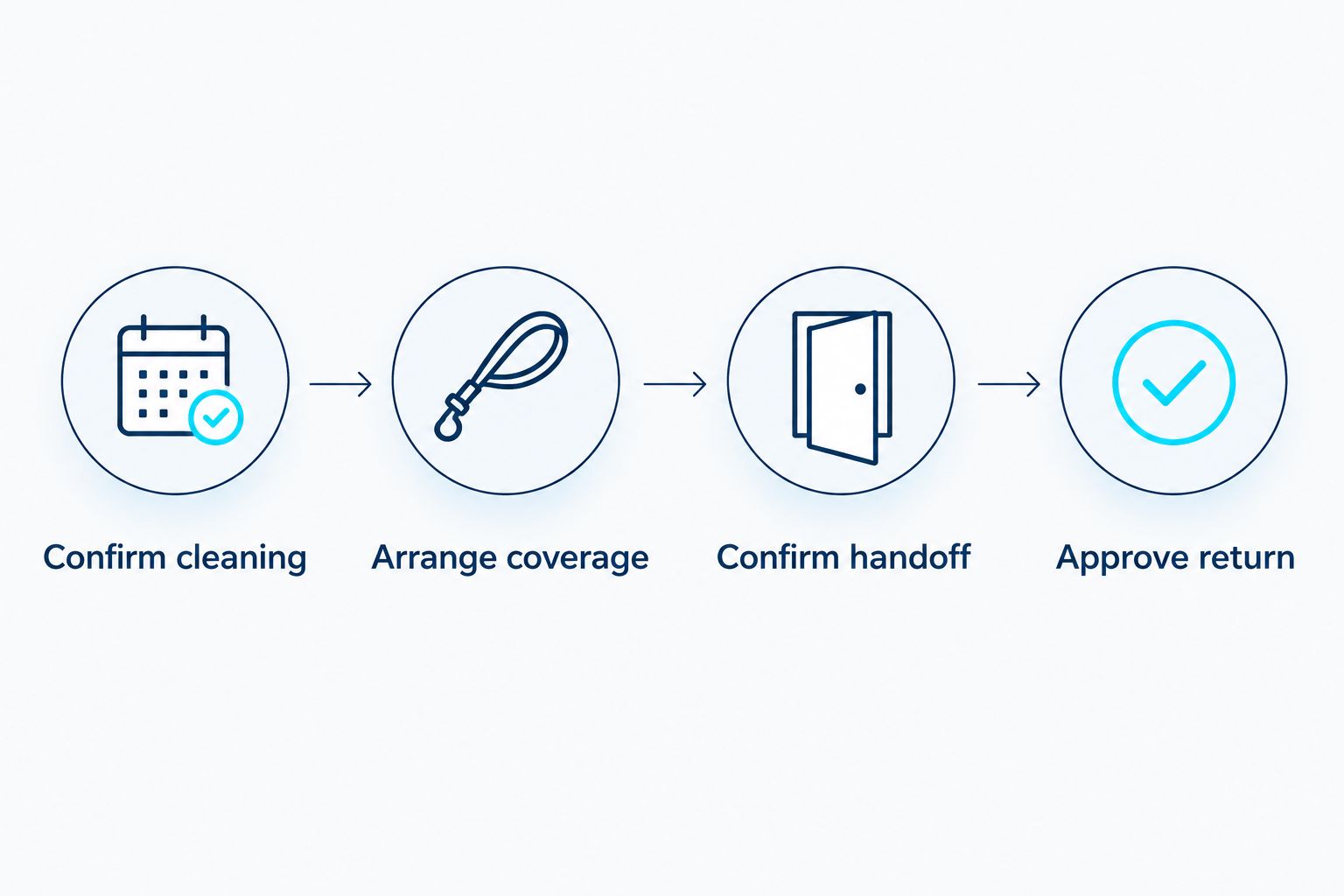
When a cleaning appointment moves, follow this order:
- Confirm the replacement cleaning appointment through the provider’s normal process.
- Ask the sitter to accept the revised coverage before relying on it.
- Update both calendar events and their instructions.
- Send the changes to invited guests and request direct acknowledgment of the new handoff.
- Remove or clearly cancel the old arrangement so nobody follows stale instructions.
This is an approval-based workflow, not an automatic booking integration. Do not automate pet-care approval from a calendar change alone. A notification can alert someone; only an accepted arrangement confirms who will care for the pet.
If you are away, designate the household adult who can make the return decision before you leave. Put that person’s name in the coordination notes rather than leaving the sitter to work out who is in charge.
Troubleshooting
The cleaner arrives before pet pickup
Keep the pet secured and contact the sitter. Tell the cleaner the actual situation before entry; do not rush an unsecured pet past an open exterior door. For the next visit, move pickup earlier or choose an at-home arrangement agreed in advance.
Cleaning continues past the sitter’s coverage
Activate the fallback you arranged before the visit. Contact the sitter and the authorized household adult rather than assuming either can stay longer. Reassess coverage for future appointments instead of repeatedly relying on a last-minute favor.
The sitter follows an old calendar event
Cancel or update the outdated event and send a direct correction. State the full date, including 2026, and ask the sitter to confirm the current plan. A changed calendar entry is not proof that someone read it.
The pet needs the room scheduled for cleaning
Agree on a different secure space or an off-site care arrangement before the appointment. If neither works, discuss the affected room with the provider. Do not move the pet between active cleaning areas without an agreed handoff.
A shared note exposes an entry code
Remove the code from the shared event and review who received it. Use your access system’s controls to change or revoke access where appropriate, then share necessary entry instructions privately with authorized people.
Customize your workflow
Start with coordination, then add the household details that actually affect cleaning day: feeding, school pickup, work calls, or a sitter’s travel route. Keep pet-care duties separate from the cleaning scope so nobody inherits a job they never accepted.
Porchandparlorcleaning residential cleaning is booked online through its BookingKoala-powered scheduling site. Use that booking process for cleaning and your sitter’s usual process for pet care; the shared calendar joins the household instructions, not the two businesses’ systems.
For a repeating routine, use the guide to set up recurring house cleaning. Confirm the cleaning pattern first, then ask the sitter which dates and coverage periods they can accept.
FAQ
What’s the best way to schedule a pet sitter around house cleaning?
Confirm the cleaner’s arrival window first, then arrange pet care that covers pickup, cleaning, and an approved return. Keep the instructions in a shared calendar, but confirm both services through their usual booking methods.
Should my pet sitter arrive before the house cleaner?
Yes, arrange earlier pickup when the sitter will take your pet out during cleaning. Choose the timing with your sitter and include enough room for the handoff before the earliest expected cleaning arrival.
Can my pet stay home while the cleaner works?
Use an at-home arrangement only after agreeing on a secure pet location with the cleaning provider. Name the person responsible for the pet and identify any room that will remain occupied or excluded.
Does adding a sitter to my calendar book the visit?
No, a calendar invitation does not book pet care. Confirm the sitter’s acceptance through their normal process before treating the coverage as arranged.
Can I automatically connect my pet sitter to my cleaning booking?
Use the shared-calendar workflow in this guide to coordinate instructions, not to automate service bookings. Confirm any supported booking connections directly with the providers before relying on them.
When can my pet return after house cleaning?
Bring your pet back after the responsible person confirms the relevant areas are ready and product-label reentry instructions are satisfied. Keep pets away from wet surfaces, cleaning equipment, and accessible products.
What should I do if the cleaning appointment changes?
Confirm the new cleaning appointment, obtain the sitter’s agreement to revised coverage, and update both calendar events. Cancel the old arrangement and request acknowledgment so nobody follows outdated instructions.
One last thing
The most useful calendar detail is not the finish time. It is the name of the person who approves the pet’s return. Add that name to your next 2026 cleaning-day event, along with a fallback contact, and you remove a decision that otherwise lands on whoever happens to be holding the leash.