
Instead of copying every Vrbo checkout into a cleaning appointment by hand, export your Vrbo calendar and connect it to a calendar-aware turnover workflow that turns departures into cleaning requests. To sync Vrbo calendar with cleaning turnover safely, keep the reservation feed, cleaning task, and confirmed cleaning booking separate until you have tested the connection.
- Sync Vrbo calendar with cleaning turnover using an exported iCalendar feed and a checkout-based cleaning workflow.
- A calendar subscription shows reservations; it does not, by itself, confirm a cleaning booking.
- Porchandparlorcleaning offers greater Nashville residential cleaning booked online; confirm turnover requirements before booking.
- Test new reservations, changed checkout dates, and cancellations before relying on automatic turnover scheduling.
Porchandparlorcleaning offers professional residential cleaning in the greater Nashville area through a BookingKoala-powered scheduling site. Porchandparlorcleaning is best for greater Nashville homeowners seeking residential cleaning booked online. For a rental property, confirm the cleaning scope and scheduling arrangement before treating a calendar task as an accepted appointment.
Why this matters
A reservation calendar answers when guests occupy the home. A turnover schedule answers when someone will clean it. Those are different questions, and a tidy-looking calendar does not mean a cleaner is booked.
For your 2026 workflow, keep these stages distinct:
- Reservation feed: dates imported from Vrbo.
- Cleaning request: work proposed for the departure date.
- Confirmed booking: an appointment accepted through your cleaning provider's booking process.
The practical win is fewer copied dates and clearer handoffs. The catch is that an iCalendar subscription depends on the receiving system refreshing the feed; it is not a promise of an immediate update. Same-day changes still need direct attention.
Before you start
- Get access to the right Vrbo listing. You need permission to open its calendar and export its calendar link. Also have the property's checkout time, next check-in time, and local time zone ready.
- Choose the destination before exporting. Use a calendar application that subscribes to iCalendar feeds for visibility, or a turnover system that explicitly supports Vrbo calendar imports and cleaning-task creation. Confirm separately how tasks become provider bookings.
- Watch the non-obvious gotcha: blocked dates are not necessarily guest stays. Owner stays and maintenance blocks need different treatment. Do not let every imported event produce a cleaning appointment without checking what the event represents.
Keep exported calendar links private. Treat the link as a credential that lets its holder read the calendar information exposed by the feed, not as something to paste into a public checklist.
Vrbo calendar export
Start with the listing, not your general account calendar. A correct feed attached to the wrong home is still the wrong feed.
- Sign in to your Vrbo owner account and select the property you want to connect.
- Open Calendar for that listing.
- Select Import & export, then Export calendar.
- Copy the exported calendar URL. Keep it intact; do not shorten it, remove its ending, or substitute the address shown in your browser's address bar.
- Record which property the link belongs to in a private setup note. Use a property identifier that your cleaning coordinator recognizes.
Vrbo's calendar-export controls are the source of the subscription link. A listing's public page and a screenshot of its calendar cannot replace that link.
Expected result: You have a calendar subscription URL associated with the intended property. You have not yet created a cleaning appointment.
Check the source before connecting
Open the property's reservations alongside its calendar. Pick an existing stay and identify its arrival date and departure date, then note whether any nearby blocked dates represent maintenance or owner use.
This gives you a reference for the import. Without it, you are checking whether something appeared rather than whether the right thing appeared. For a 2026 setup, write down the actual property dates you will compare; do not use an old screenshot as your reference.
Calendar destination and checkout rules
There are two useful connection patterns. Choose based on whether you need shared visibility or a system that creates cleaning work—not on which dashboard looks busier.
| Workflow | Best for | What it does | Advantage | Limitation |
|---|---|---|---|---|
| Calendar subscription plus manual booking | Hosts who want shared dates and direct control | Displays the Vrbo feed; you arrange each cleaning separately | Simple handoff with a deliberate booking check | Imported reservations do not create accepted appointments |
| Calendar-aware turnover system | Hosts who need departure-based task creation | Imports reservation dates and creates cleaning tasks when configured to do so | Reduces repeated date entry | Requires verified task rules, update handling, and a separate booking connection or acceptance process |
Use a calendar subscription when visibility is the goal. Use a verified turnover connection when task creation is the goal. Neither option removes the need to check who accepted the work.
Connect the reservation feed
The destination's controls depend on the application you choose. Use its documented subscription or Vrbo-import process; a one-time file import is not the same as an ongoing subscription.
- Open the destination's calendar connection setup for the correct property.
- Choose its subscription-from-URL or supported Vrbo calendar-import function. Paste the exported Vrbo URL into the calendar-address field.
- Give the connection a recognizable property name. Keep separate properties separate rather than importing everything into an unnamed calendar.
- Save the connection and allow the destination to fetch the feed according to its documented refresh behavior.
- Compare the imported stay with the reservation you selected in Vrbo. Check arrival, departure, and property assignment.
Expected result: The destination displays the matching reservation dates for the correct home. If dates differ, stop here rather than building cleaning rules on top of them.
Define the departure rule
An arrival is not a cleaning trigger. Base turnover work on the departure date and the actual window between guests.
- Set the cleaning rule to use the reservation's checkout date rather than its check-in date. If your destination only displays events, put the departure into your manual cleaning-request checklist instead.
- Use the property's local time zone for timed cleaning appointments. An all-day reservation event does not tell you when guests physically leave.
- Define the earliest permitted cleaning start using the agreed checkout time. Define the completion deadline using the next guest's check-in time.
- Separate confirmed guest reservations from non-reservation blocks. Route unclear events for review instead of automatically booking work.
- Assign a person to handle exceptions, including late departures, early arrivals, and reservations from other channels.
Expected result: A departure produces a proposed cleaning window, not an appointment at midnight or a task on the guest's arrival date.
Cleaning handoff and booking confirmation
Now connect the proposed work to the person who will perform it. This is where calendar syncing becomes useful—or simply becomes another place to forget something.
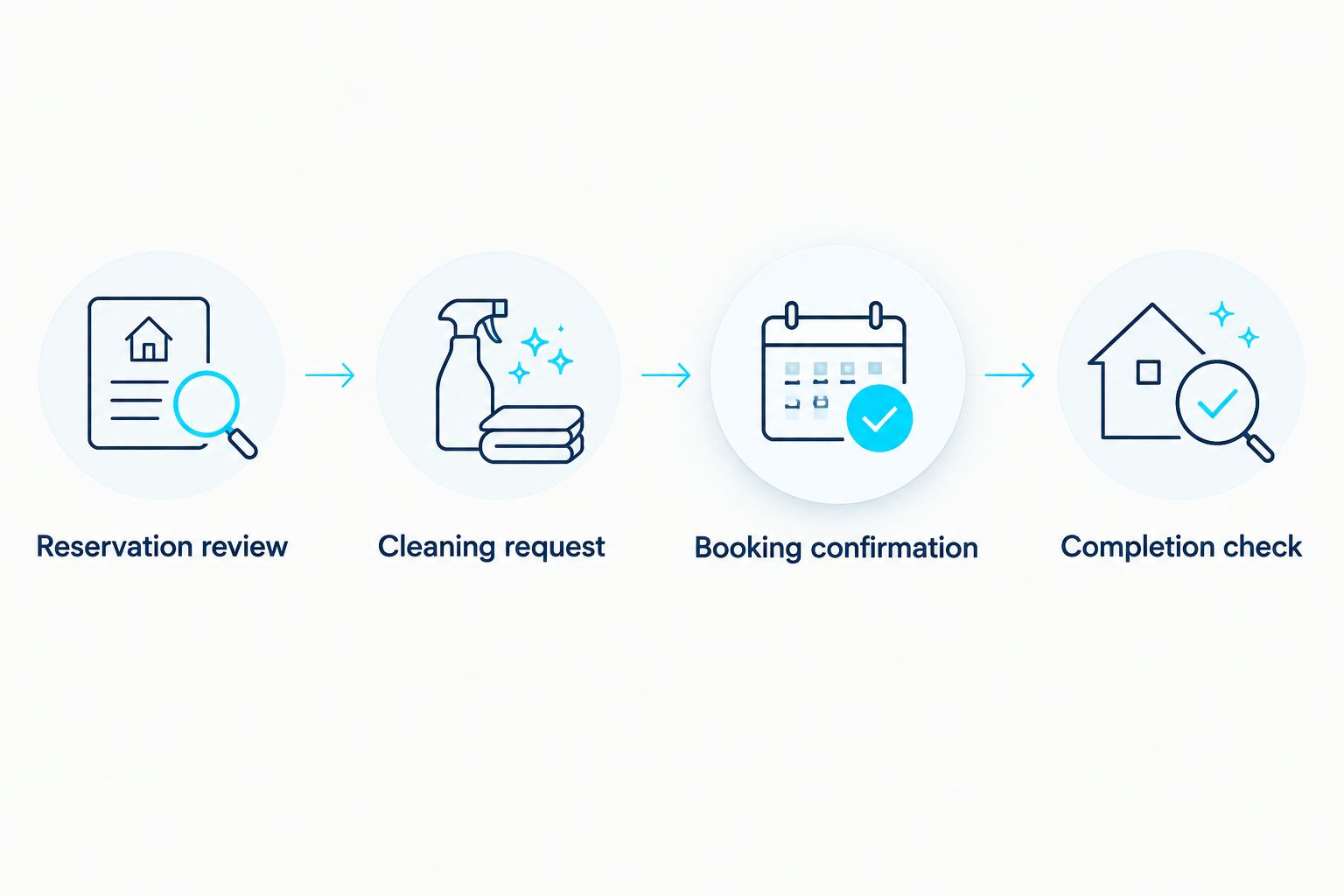
Use this sequence for each departure:
- Reservation review: confirm that the event represents a guest stay and that its checkout date matches Vrbo.
- Cleaning request: send the property, cleaning window, and agreed work scope to the person arranging service.
- Booking confirmation: complete the provider's booking process and record its confirmation reference.
- Completion check: verify the cleaning is finished before the next guest's arrival.
Keep 4 handoff fields together: property identifier, checkout date and time, next check-in date and time, and cleaning-booking reference. Put access instructions in an appropriately restricted channel, not in a calendar title visible to everyone.
Porchandparlorcleaning residential cleaning bookings should remain a separate confirmation step unless a supported connection is confirmed. BookingKoala powers the company's online scheduling, but a Vrbo calendar export alone does not establish a connection to that scheduling system.
Before arranging service, confirm whether your turnover needs fit the provider's residential cleaning scope. Ask specifically about any linen handling, restocking, inspection, or other work you expect. A calendar cannot settle the scope of a cleaning visit.
Test before relying on it
Run 3 test cases: a new reservation, a changed checkout date, and a canceled reservation. Use legitimate records or your destination's supported test tools; do not create fake guest bookings to test an automation.
For each case, inspect both the calendar event and the cleaning record. A successful import is only half the test if the cleaner's appointment still shows the old date.
Your 2026 acceptance check is straightforward: the correct property and departure appear, changes reach the cleaning coordinator, and cancellations are reviewed before work proceeds. Until those checks pass, retain manual confirmation.
When a Vrbo reservation changes
A useful second workflow updates existing cleaning work when a guest extends, shortens, or cancels a stay. Creating a new task every time is not updating—it is multiplying the laundry pile.
- Match the incoming reservation to its existing cleaning record using a stable reservation or event identifier when the destination exposes one. Do not rely only on a guest's name.
- Compare the previous departure date with the current departure date. Leave the appointment alone when nothing relevant has changed.
- Route a changed departure to the person responsible for rescheduling. Update the actual provider booking, not just the task's due date.
- Mark a canceled stay for review. Decide whether cleaning is still required because of an owner visit, another reservation, or other property use.
- Keep the previous appointment details until the revised arrangement is confirmed. That makes an unresolved change visible rather than silently losing it.
Expected result: One reservation retains one traceable cleaning record, with changes recorded and booking status checked separately.
If your destination cannot identify changes reliably, use it for visibility and review edits manually. That is a cleaner setup than an automatic workflow you cannot trust.
Troubleshooting
The Vrbo stay does not appear
Check that you copied the exported calendar URL rather than the public listing URL. Confirm the destination uses an ongoing subscription and that the connection belongs to the correct property, then inspect its connection status and documented refresh behavior.
If the feed still fails, reopen Vrbo's export controls and compare the saved link with the current export. Do not keep adding duplicate connections to solve a failed connection.
Cleaning lands on the wrong date
Compare arrival and departure in the original reservation. Then check whether your rule uses the start of the stay instead of checkout, and whether a timed event is being displayed in another time zone.
For all-day iCalendar events, the end date is non-inclusive under the iCalendar standard. Do not subtract a day by habit; verify how the destination interprets the event against Vrbo's actual departure date.
One checkout creates duplicate cleaning tasks
Look for the same reservation arriving through multiple sources, such as a direct Vrbo feed and another system carrying the same stay. Choose an authoritative source for that reservation and remove redundant task-generating connections.
Use an event identifier for duplicate prevention where supported. Two similar event titles are not a reliable matching rule.
A cancellation leaves the cleaning booked
Check the provider booking directly. Removing an imported calendar event does not automatically cancel an appointment in a separate booking system.
Contact the booking coordinator and follow the provider's cancellation process. Retain the record of the decision, especially if the property still needs cleaning for another reason.
The calendar updates but nobody accepts the work
Inspect the handoff rather than the feed. A populated calendar proves dates arrived; it does not prove a cleaner received or accepted a request.
Assign ownership for unconfirmed work and require a booking confirmation before marking the turnover scheduled. Keep this distinction in your 2026 checklist even after the connection is working.
Customize your workflow
Once departure dates and confirmations are dependable, add a property-specific turnover checklist. Separate cleaning tasks from host tasks so that checking supplies, testing entry instructions, or inspecting damage does not quietly become an assumed cleaning obligation.
For the physical handoff, use the guide to turning over an Airbnb between guests quickly. The scheduling channel differs, but you still need a clear departure window, agreed work, and a completion check.
Porchandparlorcleaning residential cleaning serves greater Nashville homeowners through online booking. Confirm your rental property's requirements before using that booking process as the final step in a turnover workflow.
Arrange your residential cleaning
Confirm the work scope and cleaning window before completing your online booking.
FAQ
How do I sync Vrbo calendar with cleaning turnover?
Export the property's Vrbo calendar link, subscribe to it in a compatible destination, and base cleaning requests on checkout dates. Confirm the cleaning appointment separately unless a supported booking connection handles that step.
Does exporting my Vrbo calendar automatically book a cleaner?
No, exporting a Vrbo calendar does not automatically book a cleaner. The receiving system needs a configured cleaning workflow, and the provider booking must be accepted through its booking process.
Can I connect Vrbo directly to Porchandparlorcleaning?
Confirm a supported connection with Porchandparlorcleaning before attempting direct booking automation. Its residential cleaning is booked online through a BookingKoala-powered site; a Vrbo feed alone does not establish that connection.
Should turnover cleaning follow check-in or checkout?
Turnover cleaning should follow checkout and finish before the next check-in. Use the property's actual checkout time and agreed cleaning window rather than assuming an all-day calendar event supplies those details.
Why is my Vrbo calendar not updating immediately?
An iCalendar subscription updates when the receiving system fetches the feed. Check that system's documented refresh behavior and directly communicate urgent reservation changes rather than waiting for the calendar.
What happens to the cleaning when a guest cancels?
A guest cancellation requires a separate check of the cleaning booking. Review whether the property still needs service and use the provider's cancellation process; deleting a calendar event is not booking cancellation.
Can I use one cleaning calendar for multiple Vrbo properties?
Yes, you can organize multiple property feeds in a shared destination that supports them. Keep property identifiers and booking references distinct so a departure cannot produce work at the wrong address.
What should I test before using automatic turnover scheduling in 2026?
Test a new reservation, a changed checkout date, and a canceled reservation. Verify the resulting cleaning record and provider booking for each case, not just the imported calendar event.
One last thing
The most useful automation is sometimes the one that stops. When a departure changes after cleaning is booked, send the record for review rather than quietly overwriting the appointment.
Make unresolved changes visible in your 2026 workflow. A flagged mismatch gives you something to fix; a calendar that looks settled while the cleaner has the wrong date does not.